How it works.
Everything about GHL Lead Central in one place: what you get, how the pool of leads works, what each filter does, how every lead is checked, and what to do with the CSV.
What this is
GHL Lead Central is a directory of businesses that run on GoHighLevel: marketing agencies, freelancers and consultants that resell or build on the platform, and the ordinary businesses (dentists, roofers, gyms) that use it. Each entry has the contact details the business publishes on its own website, a place, an industry, and a score from 0 to 100.
It is made for people who sell to those businesses: GHL agencies and freelancers looking for clients, software and service providers, and anyone who wants a located, contactable list instead of a blank search box. We are independent and not affiliated with HighLevel Inc.
We send you leads. We do not send messages for you, and we never contact the businesses on your behalf.
Getting started
- Enter your email. On the sign-in page, type your address and press the button. There is no password.
- Open the link we email you. It works once and for 15 minutes. It signs you in on this device for up to 30 days. If it expires, ask for a new one.
- Your first leads arrive. On the free plan, ten leads are picked and checked right away; this takes a minute or two and the page updates by itself. They appear in Your leads.
- Download or read them. Open the table or download the CSV of a batch.
- Want to choose? Subscribe on the pricing page. Your pool is filled the moment payment goes through.
Free and paid
| Free | Paid (Starter, Pro) | |
|---|---|---|
| How you get leads | 10 random leads every week, sent to you automatically, for as long as you like | A pool of leads, refilled every week. You decide when to take leads out, with which filters and how many |
| Filters | Not available | All filters |
| Which leads | Random | Best-scoring first, among those that fit your filters |
| CSV | One per batch | One per batch, or emailed automatically |
| Weekly size | 10 | See the pricing page (it differs per plan) |
A business is never sent to you twice. Other customers may receive the same business as you; nothing is reserved for one customer.
The pool
On a paid plan you do not receive a fixed batch. You receive a number of leads you can spend, called your pool.
- It is filled when you subscribe with one week's allowance, and again every 7 days after the last refill.
- Unused leads roll over from week to week.
- Leads burn at the end of the calendar month (UTC). Whatever is left in the pool when the month ends is gone, and the next weekly refill starts the new month. The page shows the date next to your pool.
- Taking leads out reduces the pool at once. Ask for 50 and the pool goes down by 50.
- Leads we cannot deliver come back. If some of the leads you asked for turn out to be dead sites and no replacement exists, the difference is returned to the pool automatically.
An example. Your plan adds 100 leads a week. On Monday your pool holds 100. You take 60, leaving 40. A week later 100 are added, so you have 140. If you take nothing more, whatever is left on the last day of the month burns, and the new month starts with the next refill.
If you cancel, the pool cannot be used on the free plan. See cancellation and refunds.
Choosing your leads
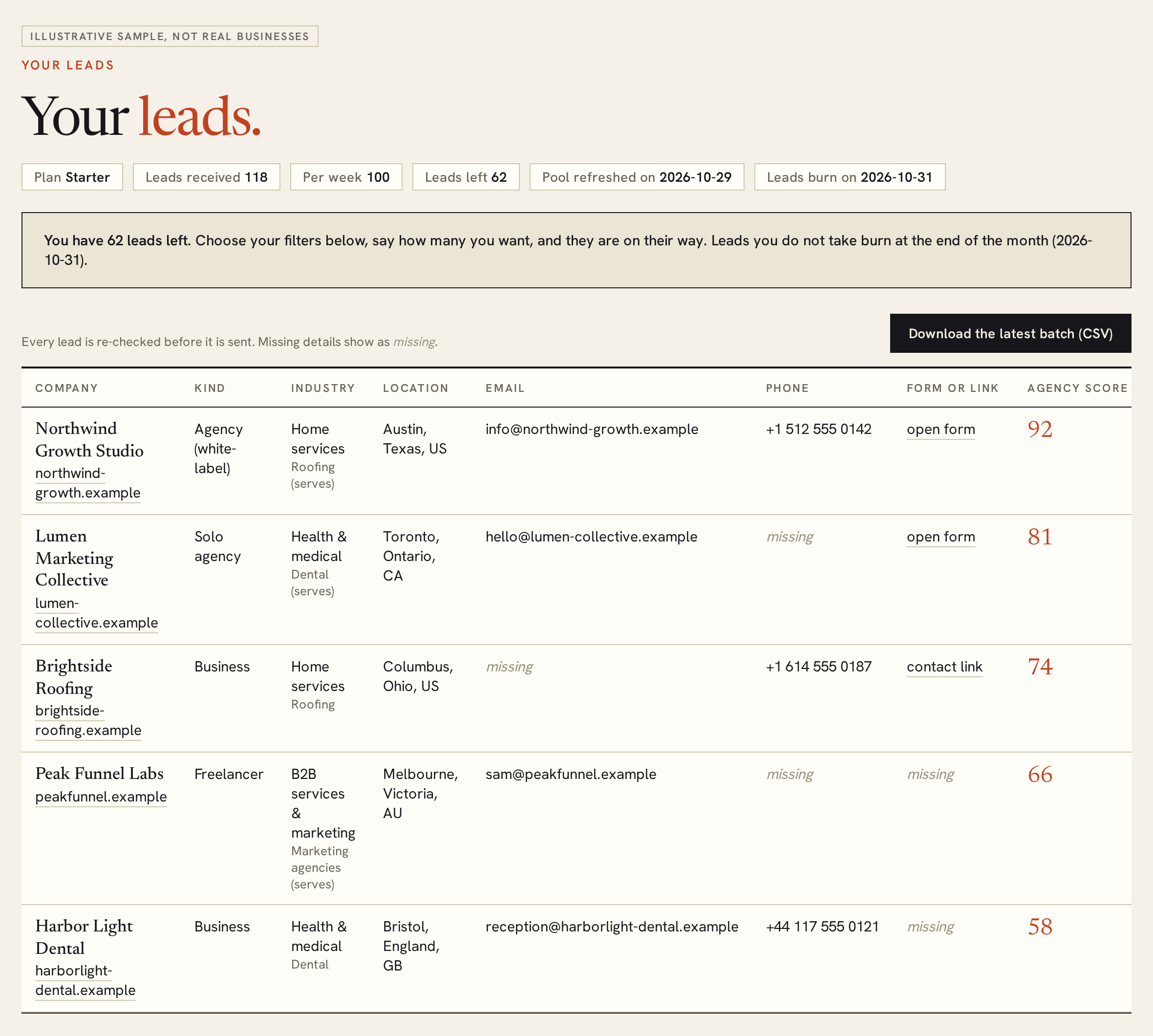
- Open Your leads and scroll to Choose your leads.
- Set the filters you care about. Leave a filter empty to ignore it.
- Type how many leads you want. You cannot ask for more than you have left. Use my whole pool fills in the maximum.
- Press Get these leads.
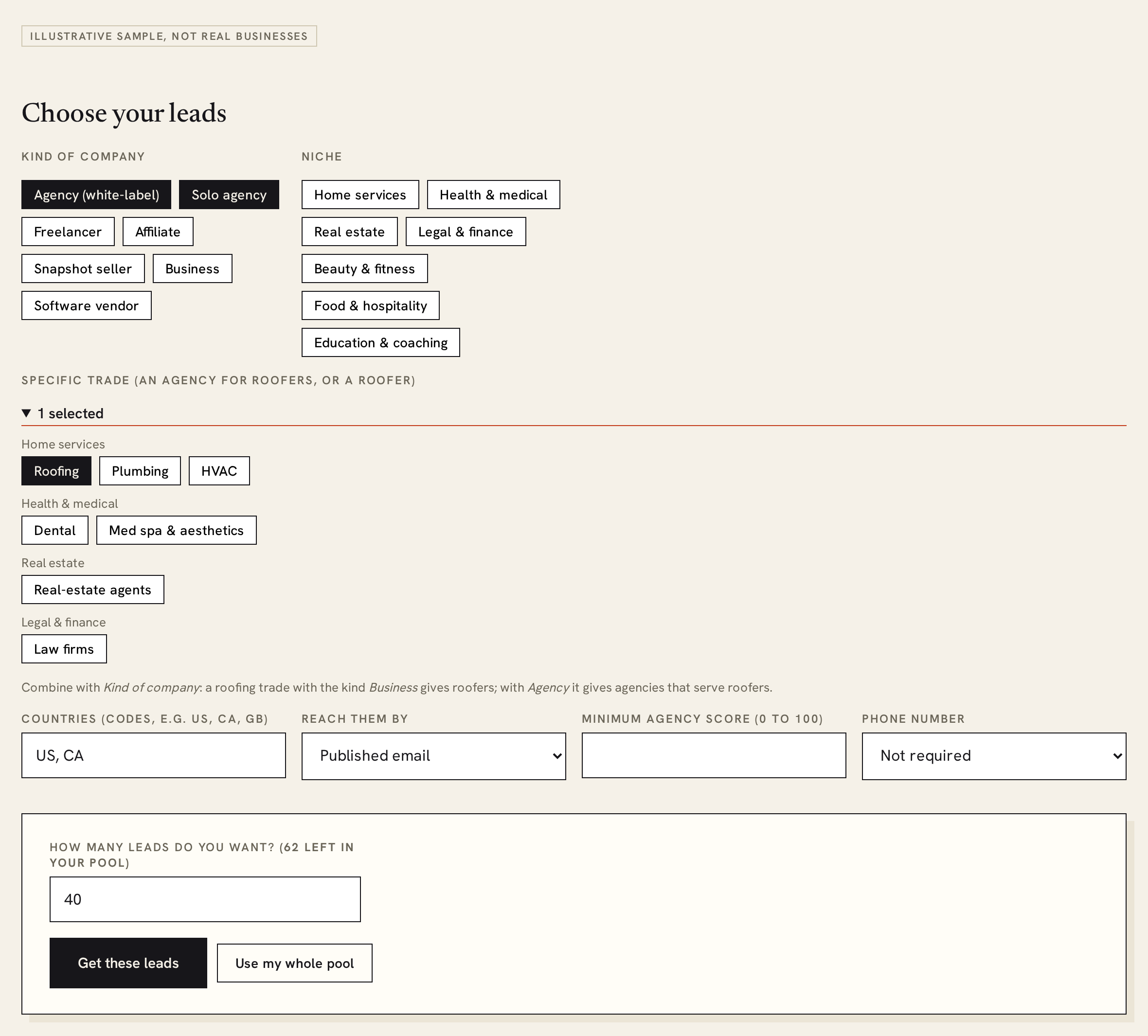
The leads are checked and appear under Your batches in a minute or two. You can order one batch at a time; the next order opens when the previous batch is ready. We never show how many businesses match a set of filters. If nothing new fits, nothing is taken from your pool and you are told so.
Within your filters, the best-scoring businesses come first, so a small order gives you the strongest ones.
Every filter explained
| Filter | What it does |
|---|---|
| Kind of company | What the business is. Agency (white-label) is an agency that sells the platform under its own brand; Solo agency and Freelancer are one-person operations; Affiliate promotes the platform for commission; Snapshot seller sells ready-made setups; Business is an ordinary company that uses the platform to serve its customers; Software vendor sells its own software. Choose several to see them together. |
| Niche | The broad industry the business works in, or that an agency specialises in: for example home services, health, real estate, legal and finance, beauty and fitness, food and hospitality, education. |
| Specific trade | A finer choice inside the industries, such as roofing, dental, plumbing, law firm or med spa. For an agency or freelancer it is the trade they serve (a marketing agency for roofers is “roofing”). For a business it is the trade it is (a roofing contractor is “roofing”). Combine it with Kind of company: roofing plus Business gives roofers; roofing plus Agency gives agencies that sell to roofers. |
| Countries | Two-letter country codes, separated by commas, for example US, CA, GB. Leave empty for anywhere. |
| Reach them by | Published email (an address on their site), Contact form (a form or booking widget), or Only a booking or contact link (a “Book a call” or “Contact us” button and nothing more). The default is any of them. |
| Minimum score | Only businesses scored at or above this number (0 to 100). |
| Phone number | Require a published phone number. |
Filters are combined: a lead must satisfy all of them. Your last-used filters are remembered, and the automatic send uses them.
How leads are checked
The directory is scanned continuously, and every lead is checked again shortly before it reaches you.
- The website is visited again. A site that no longer exists, a parked domain or a “coming soon” page is dropped and replaced by another lead that fits your filters.
- Contact details are read again, so you get the current ones. A business that has stopped publishing any contact detail stays in the batch, with those fields marked missing; some businesses simply do not show them.
- Businesses that asked to be removed are never sent.
- For companies in the EU, the UK and nearby countries we pass on only general addresses such as info@, not the addresses of named people.
We check that a website is alive and what it publishes. We do not test whether a mailbox accepts mail, and we cannot promise that a business will answer.
Batches and the CSV
Everything you receive arrives as a batch: the weekly batch on the free plan, the batch you order, or an automatic batch. Your batches lists each one with its date, size and how it was made.
- Every batch has its own Download CSV. It contains only the leads of that batch, never your earlier ones.
- Download the latest batch at the top downloads the newest one.
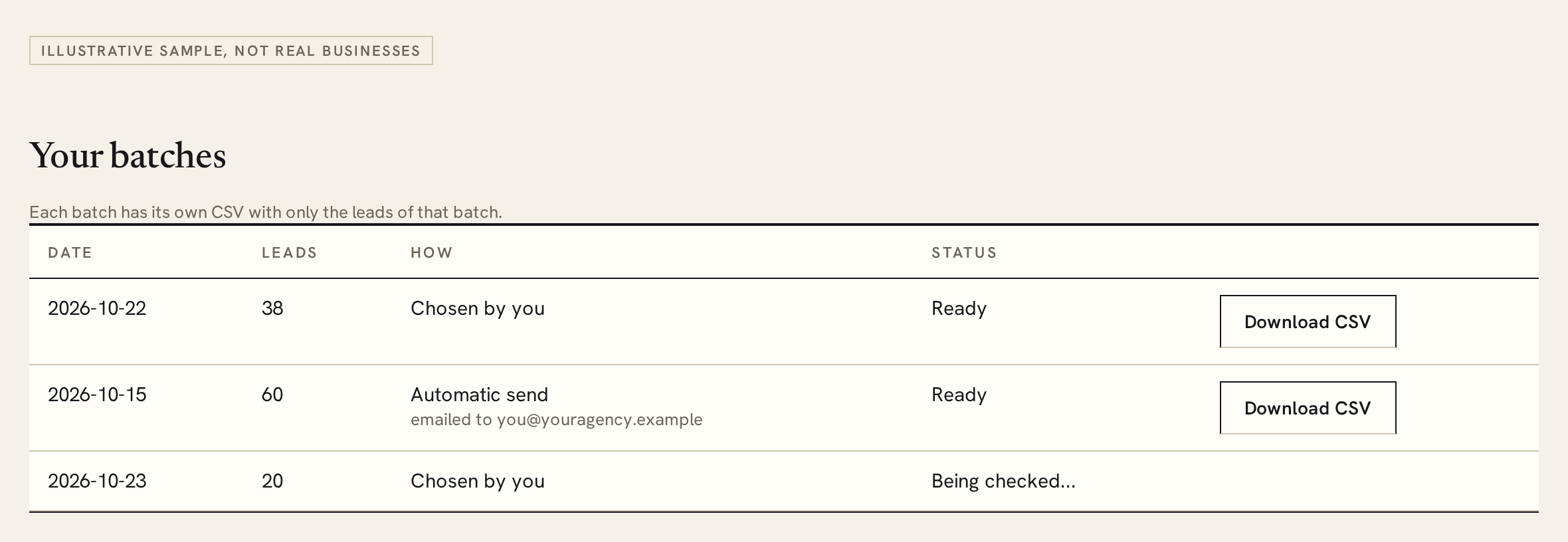
- The table below the batches lists every lead you have ever received.
- The CSV is UTF-8 with a byte-order mark, so Excel and Google Sheets open it correctly.
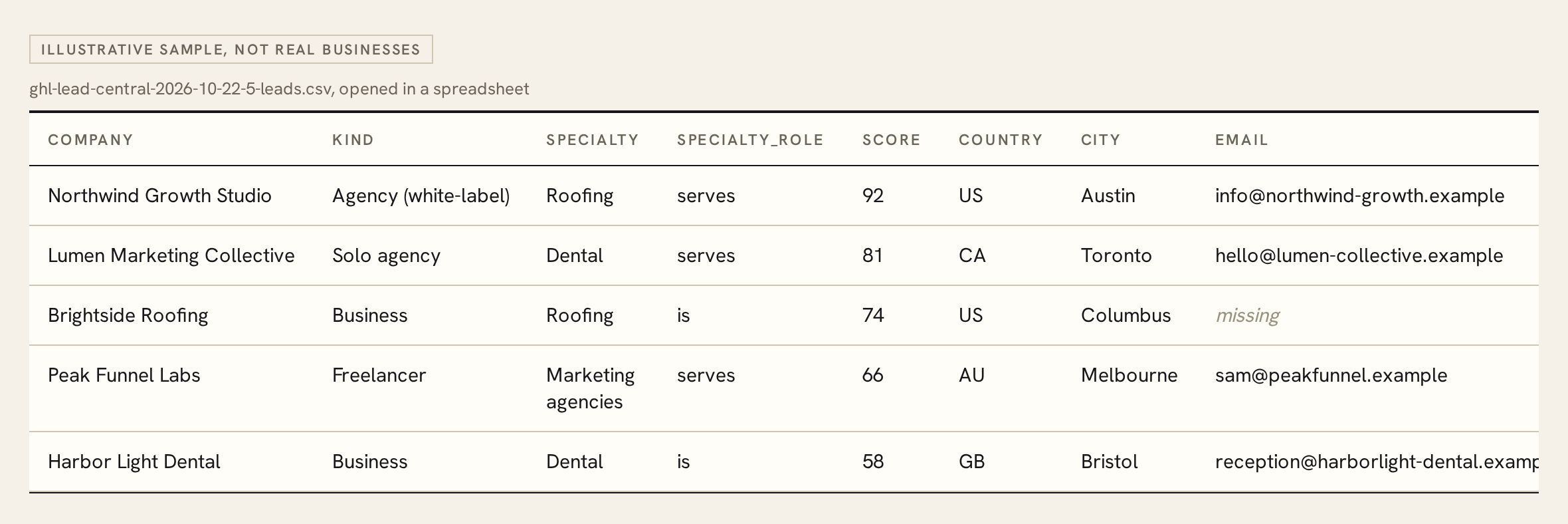
The CSV columns:
| Column | Meaning |
|---|---|
company, website | The business name and its website. |
kind | What the business is (see the filters above). |
niche, specialty, specialty_role | The industry and trade. specialty_role says serves (the trade an agency sells to) or is (the trade of the business itself). |
offer | The main thing the business sells. |
score | The 0 to 100 score. |
country, region, city | Where the business is. |
email, phone | Published contact details. A phone is written with the country code. |
contact_form | A link to its contact form or booking widget. |
contact_link | A “Book a call” or “Contact us” link, for businesses that have only that. |
sent_on | The date the lead was delivered to you. |
Automatic send
If you would rather not click each week, turn on Automatic send when the pool is refreshed on the leads page.
- Tick the box and enter the email address where the leads should go. It can be your own or a teammate's.
- Pick the date you want sending to start.
- Press Save.
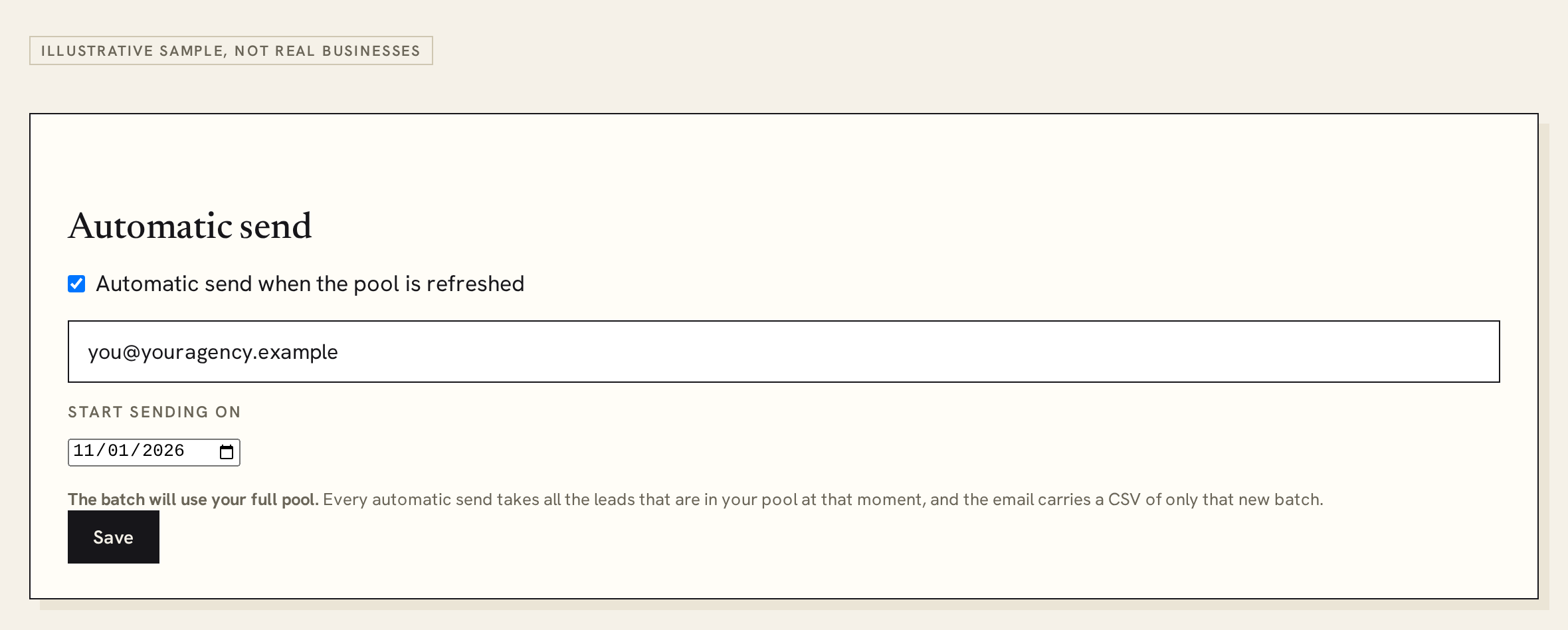
From that date, every time your pool is refreshed, we take your whole pool with the filters you used last, check the leads, and email that address a CSV of only the new batch. The batch also shows up in Your batches. Because it uses everything in the pool, there is nothing left to choose by hand until the next refill; if you want to keep some leads for a hand-picked order, turn automatic send off or take them out first. Set your filters before the start date: automatic send uses the last filters you ordered with.
Reading a lead
- Score (0 to 100). How closely the business fits the directory's idea of a working agency or a serious practitioner. Higher is a stronger fit. It is a guide to where to start, not a promise.
- missing. We do not have that detail. Nothing is ever left blank in the table or the CSV: a field we could not find says missing.
- Email. An address published on the business's own website. It can be a shared inbox (info@) or a person's address. We never guess or build addresses.
- Form or link. A real contact form or booking widget is shown as open form; a bare “Book a call” button as contact link.
- Location. City, region and country, shown when we know them.
Billing and your account
- Paying. Press Subscribe on the pricing page. You are taken to Stripe's secure checkout. We never see your card number.
- Renewal. Plans are monthly and renew until you cancel.
- Cancelling and card changes. Account → Manage billing opens Stripe's portal, where you can cancel, update your card and download invoices. After you cancel, you keep the paid plan until the end of the period you paid for.
- Changing plan. Use the billing portal, or ask us. Your pool takes the new weekly allowance from the next refill.
- Emails. The weekly email on the free plan can be switched off from the link inside it. Your leads still arrive in your space. Sign-in and billing messages are always sent.
- Deleting your account. Reply to any email we send you and we delete it. See the privacy policy.
Contacting businesses responsibly
You decide whom to contact and what to say, and you answer for it. The short version:
- Write about their business, say who you are, and give a clear way to opt out. Honour it.
- Lead with something useful to them rather than a generic blast. Short, specific messages to a handful of well-chosen businesses work better than mass mailing, and they keep your sending domain healthy.
- Different countries have different rules (for example CAN-SPAM in the US, GDPR and ePrivacy in Europe, CASL in Canada). Read the acceptable use policy for a summary and check the rules where you send.
- If a business asks to stop, stop. If it asks us to remove it, we do, and you will not receive it again.
Questions
How fresh are the leads?
The directory is scanned continuously and each lead is re-checked shortly before delivery. Websites still change, so a small share of any list will be out of date.
Why do some fields say “missing”?
Not every business publishes every detail. We do not guess, so a field we could not find says missing.
Do all leads have an email?
No. A lead has at least one way to reach the business: an email, a contact form, or a booking or contact link. You can filter by which one you prefer.
Are the email addresses verified?
They are addresses the business published on its own website, and the site is confirmed alive before delivery. We do not test whether each mailbox accepts mail, so expect some bounces, as with any list.
Will I get the same business twice?
No. Every business is sent to you at most once. Other customers can receive it too.
Can I get leads for one country or one trade only?
Yes, on a paid plan: use the Countries and Specific trade filters. If few businesses match, you may get fewer than you asked for; only what was found is taken from your pool.
Why did I get fewer leads than I ordered?
Either fewer businesses fit your filters, or some were dropped by the final check and no replacement existed. The leads you did not receive go back to your pool.
What happens if I do not use my pool?
Unused leads roll over week to week and burn at the end of the calendar month.
Can I get a refund?
Can I use the leads for cold calling or SMS?
Only where the law allows it and you have any consent it needs. Many countries restrict calls and texts more than email. See acceptable use.
Is this connected to HighLevel?
No. We are independent and not affiliated with or endorsed by HighLevel Inc.
Help and removal
- A question or a problem? Reply to any email we send you.
- Is your own business in the directory and you would rather it were not? Use the removal page. See also how we handle business data.
- The rules: Terms of service, Privacy policy, Cookies, Acceptable use, Cancellation and refunds.